Decision support is software that guides employees into making quality decisions in support of an organization’s goals. It is predominantly used when the knowledge domain is complex and the decision-making process is difficult.
Why is decision support important for Health Care?
A Clinical Decision Support system helps clinicians in assessment, diagnosis, and giving appropriate and safe case-specific advice. It is important for improving patient outcomes and delivering higher quality care for busy clinicians and is a central component of Electronic Health Records and Healthcare CRMs HealthCare CRMS.
Decision support helps anyone navigate complicated decisions. It is crucial to simplifying and improving the work of your teams.
TAKE THIS RESOURCE WITH YOU
An expert system is a type of artificial intelligence application. It embeds knowledge and decision criteria from experts in the field into software for purposes of guiding non-experts to the right path. Experts even use it to maintain quality while making quick decisions. An expert system combines multiple types of decision support to assist users through many types of hurdles.
An expert system takes complicated rules, knowledge, and processes and packages them into an easy experience. The knowledge that goes into these systems can take years to hone and might even be too extensive and complicated for a single person to ever master. For example, no single person may have a full grasp of the following:
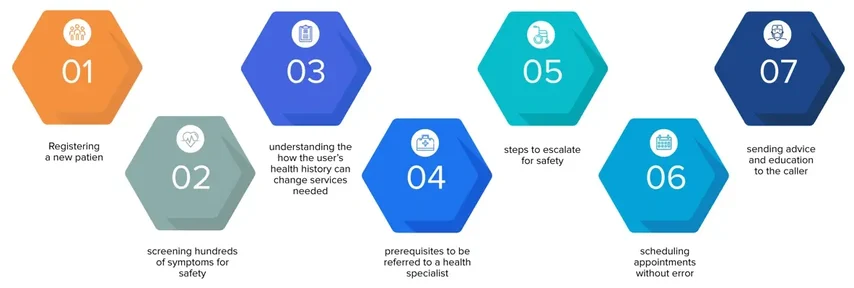
Navigating these is daunting for staff, much more patients. However, all of these can be encoded into CareDesk with easy guidance for their existing users and honed over time.
(click to see a visual explanation)
New requirements come in that requires a change to process. Say a new provider is added, there is a change to insurance, procedure requirements are updated, or any new process is updated. Operations has to undertake the following steps:
New requirements come in that requires a change to process. Operations has to:

Data collection and scripting is robust and set to respond interactively to feedback from the expert system. It supports 10 question types:
Decision trees can be tailored to any scenarios you need. Apart from data input, branching can be determined by situational factors. Some of these situation factors are:
The rules engine is built to work with clinical concepts and actionable results. It supports multiple inference types depending on the need – forward, backward, and hybrid.
Event monitor looks for events on which a decision should be made. An event is something that occurs in the software. Here are some sample events:
When an event occurs, the rules engine can check for matching conditions, launch a decision tree, or trigger further actions.
Expert Knowledge Bases include custom content, as well as licensed content.
Keona Health Publishing content is licensed for NLP Symptom Screening
Schmitt-Thompson Clinical Content is licensed for Nurse Triage
Results of the expert system include Care Advice, Dispositions or Health Education. It can also result in software automation including:
CareDesk contains several pre-packaged expert system products, including
Nurse Triage for clinicians
Symptom Checker for non-clinicians
and more! Contact us for more information.
Feel free to send us a message.